Business Software
What is application integration? A practical guide
Learn what application integration means, how connected apps can reduce manual work, and how workflow automation differs from data integration.
Also available in: Español, Français, Deutsch, Português (Brasil), Italiano, Nederlands, 日本語, हिन्दी, 한국어, 简体中文
On this page
What is application integration? It's connecting separate apps so they can exchange information and coordinate work. A website inquiry can create a customer record and a follow-up task without someone copying the details. Your existing tools may support these connections, but you need to check costs and responsibility for failed updates.
What is application integration?
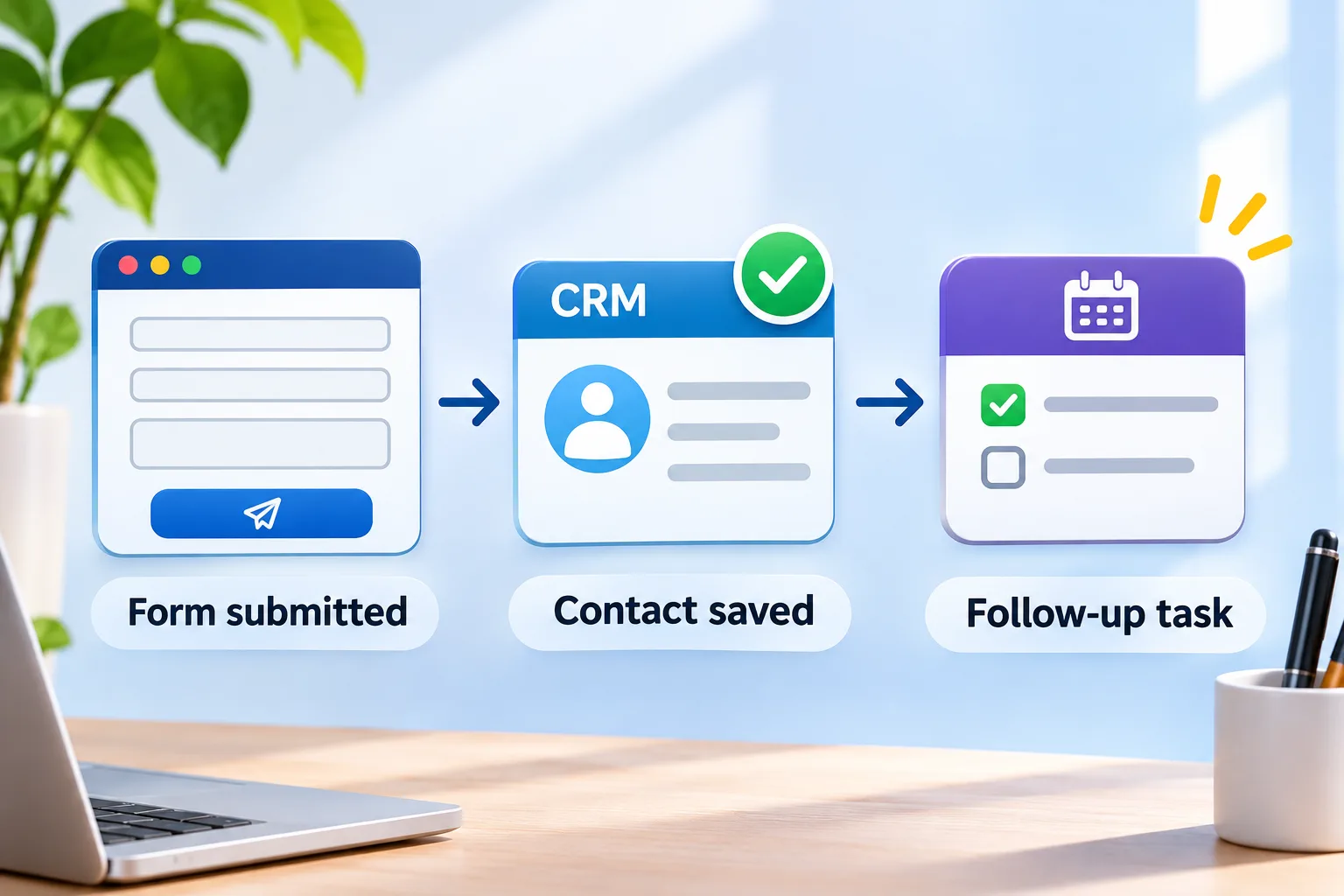
Application software integration connects separate apps so information in one can prompt work in another. The connection needs rules about what information moves and what the receiving app should do. For example, a submitted inquiry can tell your customer system to save a contact and assign a follow-up task.
The workflow is: form submitted → contact saved → follow-up task. Each arrow represents a handoff that needs to work, not just a transfer of text between screens.
Enterprise application integration extends this coordination across an organization, such as connecting sales, billing and customer support. It doesn't necessarily require replacing your tools. Start by checking whether each app allows the information and actions your workflow needs, rather than assuming a new system is required.
What are the benefits of application integration?
Application integration can reduce repeated data entry and shorten handoffs, provided the connection follows your business rules. Moving information automatically removes a copying step, but it doesn't guarantee correct records. A wrongly mapped email field can still send the wrong information to the next app.
Consider a hypothetical service business whose website receives an inquiry. The trigger, the event that starts the workflow, is a successful form submission. The connection sends the person's name, email address, requested service and message to a customer relationship management system (CRM), which stores customer records. It then creates a follow-up task for the person responsible for that service, using an agreed due-date rule.
In a hypothetical nonprofit workflow, a confirmed donation could update a donor record with the amount, date and payment reference. Staff would no longer need to copy each donation manually, but the connection still needs a rule for matching existing donors. Measure the workflow before and after launch to see whether the saved effort outweighs correction work.
- Count the manual steps needed for each inquiry or donation.
- Track records that need correction, including duplicates.
- Measure the time from the trigger to the completed handoff.
Application integration vs. data integration: what's the difference?
Application integration coordinates operational work, while data integration brings information together for uses such as reporting. Data integration may also transform information, meaning it changes formats or combines fields into a consistent structure. Both sit within system integration, the broader work of making separate systems function together, and their purposes can overlap.
| Aspect | Application integration | Data integration |
|---|---|---|
| Main purpose | Coordinate actions across apps. | Collect and prepare information for shared use. |
| Example | Save an inquiry in a CRM and create a follow-up task. | Combine donation and donor records into a fundraising report. |
| Completion check | Confirm the intended record and task exist. | Confirm the report contains complete, consistently formatted records. |
| Timing | Can respond to events or run on a schedule. | Can respond to events or run on a schedule. |
An inquiry-to-task connection succeeds when the task reaches the right person with the right details. A donor-report connection succeeds when donation records can be combined and interpreted consistently. Neither must update instantly: choose timing based on how soon someone needs to act or use the information. For example, you might require prompt inquiry routing but accept an overnight donor report, provided that delay meets your team's needs.
What does application integration cost and require?
Application integration needs a setup budget and an ongoing operating budget. Setup covers mapping fields, configuring connections and testing the workflow. Recurring costs can include platform subscriptions, usage charges, monitoring for failed updates and maintenance when either app changes.
The effort depends on access to your apps, the condition of your records and the rules the connection must follow. Check whether your subscription permits the required connection and actions before commissioning work. Duplicate contacts, custom assignment rules and frequent updates can add work or affect platform charges.
For the inquiry workflow, specify how to match an existing contact and how soon the follow-up task must appear. Those decisions give a provider something concrete to price. AppDesign360 lists custom business software labor from $20/hour USD, with fixed projects quoted individually; that starting rate isn't a total integration quote.
Ask for setup and recurring charges to be identified separately. Name the person responsible for monitoring and confirm who pays for later changes.
What are the best application integration tools for your workflow?
The best application integration tools are the ones that support your exact workflow at an operating cost you can accept. Start with required actions, rather than a product name. For the inquiry workflow, a connection that creates contacts but cannot assign follow-up tasks leaves part of the handoff unfinished.
An application programming interface, or API, is a defined way for software to request information or actions from another app. A webhook is a message an app sends when an event occurs, such as a form submission. The webhook can start the workflow; an API request can then create the contact.
Middleware is software between applications that routes information or translates its format. Integration platform as a service, or iPaaS, is a hosted platform for building and managing those connections. Direct custom code instead connects the apps through logic your developer writes and maintains.
| Approach | Supported actions to check | Limits to check | Maintenance responsibility |
|---|---|---|---|
| Built-in connector | Does it save contacts and create assigned tasks? | Available fields, matching rules and subscription requirements. | The vendor maintains the connector; you manage configuration and check outcomes. |
| Shared integration platform, including iPaaS | Can it coordinate the form, contact lookup and task assignment? | Supported app actions, usage allowances and update frequency. | The provider runs the platform; your operator maintains workflow rules. |
| Direct custom code | Do the apps' APIs support the required contact and task actions? | API access, request limits and development scope. | Your team or contracted developer maintains the code and its operation. |
Prefer a built-in connection if it covers the whole handoff, including matching existing contacts. Consider a shared platform when the workflow spans several apps, or custom code when required rules aren't supported. Custom code gives you control, but you must budget for its upkeep. Test the actual actions before committing.
How do you plan your first application integration?
Plan one complete handoff before connecting more workflows. Define success as a completed business action, such as an assigned follow-up task, rather than information merely leaving the form.
- Choose one workflow and identify its trigger, destination and required completion time.
- Map the fields that move, such as name, email, requested service and inquiry reference.
- Decide which app's record takes priority when values conflict, and how existing contacts are matched.
- Test new and existing contacts, missing fields and repeated submissions before using live inquiries.
- Launch with a named operator, check completed tasks and confirm how to pause the connection.
An existing contact makes the priority rule concrete. Decide whether a new inquiry should overwrite that person's details or add a separate inquiry record. Put that decision in the scope, alongside this checklist.
- Confirm required app access and subscription permissions.
- Define ownership of code, hosting and connected accounts.
- Name an operator who checks completed handoffs.
- Agree the scope, acceptance tests and launch date in writing.
- Separate setup costs from recurring charges.
- Assign support responsibilities for failures and later app changes.
What happens when an integration update fails?
A sent update isn't proof that the receiving app completed the action. In a hypothetical inquiry workflow, your website could accept a submission while the customer relationship management system (CRM) rejects it because access has expired. Check for the saved inquiry and assigned task, not just a successful form submission.
A retry sends a failed update again, but it needs duplicate prevention. Use a unique inquiry reference so another attempt doesn't create a second inquiry or follow-up task. Retry temporary failures; restore revoked access before trying again.
Keep an error record, name an alert recipient and define how to recover unfinished work. Test delayed updates and revoked access before launch. For example, confirm that restoring access lets an operator recover a missed inquiry without duplicating an existing contact.
How can AppDesign360 help you connect your business tools?
AppDesign360 scopes connections around the business workflow you need to complete. Our custom business software service starts with the workflow, its users and the cost of the problem, then defines a useful first release. That can include connecting existing tools rather than commissioning a replacement system.
For your inquiry workflow, bring the app names, required fields and an example of a failed handoff to the discussion. Ask the written scope to identify completion checks and recovery responsibilities alongside the connection itself. The service and starting-price details below come from AppDesign360's published service descriptions; separate services aren't interchangeable integration packages.
| AppDesign360 profile | Published details |
|---|---|
| Business and certification | Founded in 2018, AppDesign360 is the website, software as a service (SaaS) and custom software engineering brand of Mango Consulting LLC, an SBA-certified Service-Disabled Veteran-Owned Small Business (SDVOSB). SBA means US Small Business Administration. |
| Customers and locations | Serves small and growing businesses, founders and nonprofits across the United States and Canada, and takes on federal set-aside work. The local team is based in Teaneck, NJ and Queens, NY, with remote delivery and service areas including North Bergen, NJ, Bergen County, NJ and New York City. |
| Website development | Custom-coded business websites rather than templates, from $1,500 USD. |
| SaaS development | SaaS Blueprint from $1,250 USD; a minimum viable product (MVP), a focused first release, from $15,000 USD. |
| Mobile development | iOS and Android app builds from $3,500 USD for an agreed starter scope. |
| Business systems | Custom business software and client portals, including workflow tools and connections between existing systems. |
| AI-built app review | Paid review of an existing artificial intelligence (AI)-built app, with written findings and a retain, repair or rebuild recommendation. Completion and launch implementation are scoped separately. |
| AI engineering and setup | AI solutions, large language model (LLM) integrations and automation; open source AI setup sessions; healthcare AI setup addressing the Health Insurance Portability and Accountability Act (HIPAA). |
| AI coaching and consulting | AI coding coaching from $125 USD per session; business AI consulting from $250 USD per session. These aren't done-for-you integration or launch packages. |
| Staff augmentation | Information technology (IT) staff augmentation from $20 USD per hour. |
| Search services | Plans from $500 USD per month for search engine optimization (SEO), answer engine optimization (AEO), AI optimization (AIO) and generative engine optimization (GEO). Included work is defined in the proposal. |
| Paid advertising | Google, Meta or Bing ads management from $300 USD per month per platform. Google Local Services Ads management starts separately at $599 USD per month for eligible businesses. Ad spend and platform charges are additional. |
| Scope and ownership | Scope, price and launch date are agreed in writing before work starts. Clients keep their code, hosting and accounts, with ownership and handover defined. |
| Discovery and support | Free 20-minute discovery call. Support after launch comes from the team that built the product, including 30 days of fixes on new builds. |
Discuss your project at https://appdesign360.com/contact to arrange AppDesign360's free 20-minute discovery call. Use it to discuss your workflow and the appropriate next step; implementation is scoped and quoted separately.
Key Takeaways
- •Application integration connects apps to complete business actions, such as turning an inquiry into an assigned follow-up task.
- •Choose a connection by its supported actions, ongoing costs and maintenance responsibilities, rather than its feature count.
- •Treat completion checks, duplicate prevention and failure recovery as part of the project scope.
What is enterprise application integration?
What are the benefits of application integration?
What role does an iPaaS play in application integration?
Start a free project conversation about a website, software, app or marketing.
Discuss Your Project
Comments